
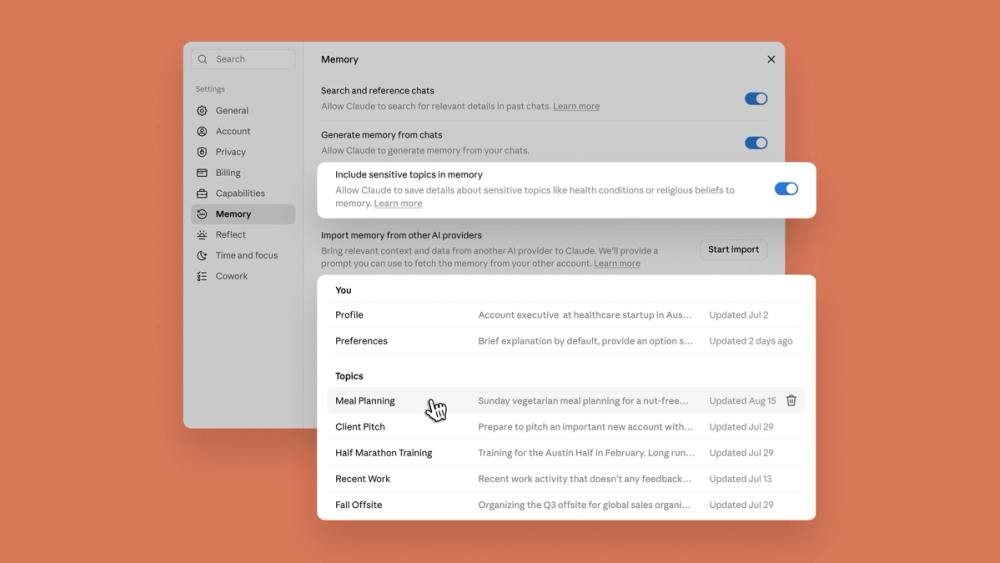
Source: TechCrunch's independent report, which credits the image to Anthropic. The same controls are described in Anthropic's official announcement.
Claude shared memory fixes a familiar AI problem: you explain a project in chat, switch to an action-oriented workspace, and have to explain it again. Anthropic now says Claude Chat and Claude Cowork use one memory, with topic-level controls that users can inspect and edit.
That continuity is genuinely useful. It also means a remembered preference, client detail, or project assumption can influence later tasks. The right question is not simply whether memory saves time. It is whether you can see what persists, keep it current, and limit the consequences when it is wrong.
Quick Navigation
- What is Claude shared memory? One editable store now connects Chat and Cowork.
- What changed? Memory updates during conversations and follows work across the two surfaces.
- How does it work? Claude saves topic entries rather than relying only on the current chat.
- What should developers test? Staleness, scope, correction, and action boundaries.
- Who should turn it on? Users with recurring, reviewable workflows benefit most.
- FAQ: Five direct answers about availability, privacy, controls, and Claude Code.
What is Claude shared memory?
Claude shared memory is Anthropic's new single memory store for Claude Chat and Claude Cowork. Context saved while you discuss a project in chat can now be available when Cowork starts a related task, so the handoff does not begin from zero. Anthropic's official announcement says the memory is organized as topic entries that users can review, edit, or delete, and the official product thread says entries can update while a conversation is still happening. TechCrunch independently reported that the feature is enabled by default on Free, Pro, and Max plans across web, desktop, and mobile. The practical tradeoff is continuity versus retained context: a useful old preference can prevent repeated briefing, while a stale or overly broad memory can shape later work in ways the user may not notice. The sensible first step is therefore an audit, not blind trust.
What We Know So Far
The evidence supports a narrower story than “Claude remembers everything everywhere.”
- Official fact: Anthropic announced a shared memory between Claude Chat and Claude Cowork.
- Official control: Saved information appears as topic entries that users can read, edit, or delete.
- Independent confirmation: TechCrunch reported the same behavior, plan coverage, app availability, and sensitive-topic defaults.
- Scope boundary: The announcement names Chat and Cowork. It does not confirm the same store for Claude Code, local Cowork sessions, Team, or Enterprise deployments.
- Our inference: Editable memory is a better control surface than opaque memory, but transparency does not guarantee that every saved entry is correct, current, or appropriate for a later task.
What changed in Claude's memory?
- Chat and Cowork could require separate briefing: New public behavior: One announced memory spans both surfaces; Why it matters: A task can start with project and preference context from prior chats
- Memory was easier to treat as a hidden summary: New public behavior: Settings shows topic entries; Why it matters: Users can inspect, edit, or delete specific remembered information
- Updates could lag behind the conversation: New public behavior: Anthropic says memory updates while you chat; Why it matters: A changed deadline or preference can become available sooner
- Sensitive topics were a broad trust concern: New public behavior: Sensitive-topic saving is off by default; Why it matters: Users must opt in before those categories are retained
Anthropic's launch thread gives a simple example: discuss a project, a manager's preferences, or a client in Chat, then hand a related task to Cowork without restating that context. TechCrunch's report confirms the product intent and notes that users can also ask Claude to remember a specific detail.
The important change is not raw model intelligence. It is continuity across product surfaces. Memory becomes part of the workflow architecture instead of a convenience tied to one conversation.
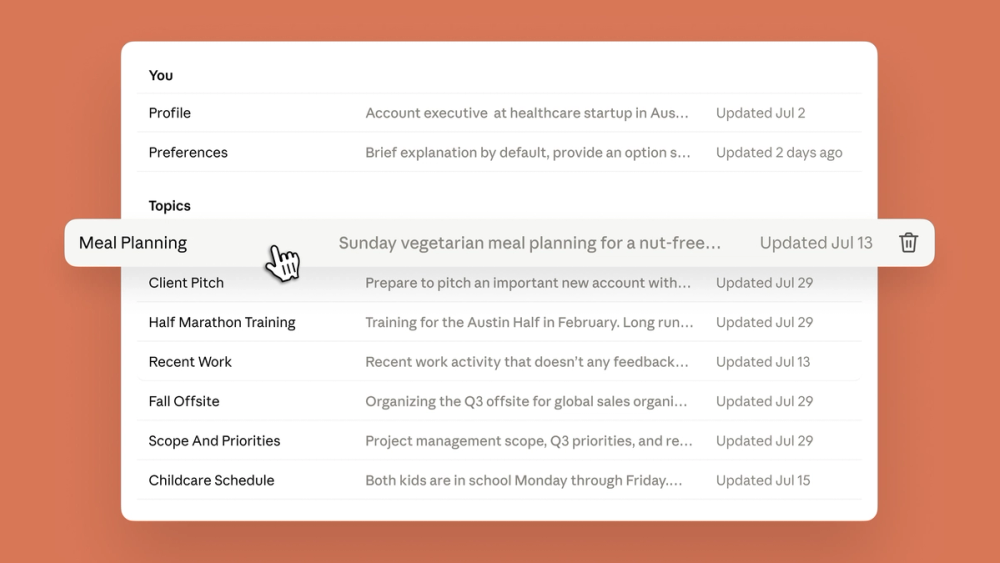
Source: TechCrunch's article, which identifies this as an Anthropic image. The visible list demonstrates topic-level memory and deletion controls; it does not prove that every remembered detail is accurate.
How does Claude shared memory work?
Claude's current product model appears to have three layers:
- Conversation history: the messages and files inside a specific chat. 2. Search across past chats: a setting that lets Claude find relevant details from previous conversations. 3. Generated memory: topic entries that persist beyond a single chat and can be used across Chat and Cowork.
The screenshot matters because it makes those layers visible as separate settings. A user can allow search across chats, allow generated memory, and separately decide whether sensitive topics may enter memory. The topic list then gives the user a correction surface.
That is better than an invisible profile, but it creates a maintenance job. A memory about a preferred writing style may stay useful for months. A memory about a deadline, employer, customer, dependency, or security policy can become stale quickly. If Cowork takes actions based on old context, the cost of staleness is higher than it is in a casual chat.
What should developers test before relying on it?
Developers and technical teams should treat memory as mutable application state, not as a magical extension of the model's context window.
1. Test correction, not just recall
Create a harmless project fact, confirm Claude remembers it, then change the fact and inspect the topic entry. The useful metric is not “Did it remember?” It is “Did the correction replace the stale value before the next task used it?”
2. Separate preference memory from task state
Stable preferences such as tone, output format, or coding conventions are good memory candidates. Fast-moving task state—deployment status, deadlines, branch names, customer approvals—should still live in an authoritative system that the agent reads at task time.
3. Check the surface boundary
The official announcement covers Chat and Cowork. Do not assume Claude Code, local Cowork, API sessions, Team workspaces, or Enterprise policies share the same state until the relevant product documentation confirms it for your account.
4. Keep consequential actions reviewable
Memory can reduce repeated briefing, but it should not silently widen permissions. A remembered client or project should help prepare a draft. It should not substitute for confirming recipients, file scope, credentials, or external actions.
5. Build an audit habit
Review Settings → Memory after major project changes, role changes, or sensitive conversations. Delete entries that no longer serve a recurring workflow. The feature is easier to trust when the retained state is small enough to understand.
Who should turn Claude shared memory on now?
Turn it on if
- you repeatedly move between project discussion and Cowork tasks;
- your remembered context is mostly stable preferences and low-risk background;
- you are willing to review the Memory topic list before important work;
- Cowork outputs remain drafts or otherwise require human confirmation;
- repeated briefing is a measurable source of friction.
Pause or restrict it if
- your work routinely includes regulated, legal, medical, financial, personnel, or identity data;
- project facts change quickly and stale context could produce a costly action;
- you need separate memory boundaries between clients or roles;
- your organization has not defined retention, deletion, and administrator policy;
- you are assuming coverage for Claude Code, local Cowork, Team, or Enterprise without current documentation.
The useful middle ground is not “memory on for everything.” It is memory for stable, inspectable context while authoritative systems continue to hold facts that must be current.
What remains unclear?
The public evidence does not yet answer several practical questions:
- how often generated memories are wrong, incomplete, or stale;
- whether a deleted chat leaves related generated memory intact in every case;
- how memory behaves across accounts, organizations, and administrator policies;
- whether local Cowork or Claude Code will join the same store later;
- how quickly edited or deleted memory stops affecting already-running tasks;
- whether users meaningfully review the topic list after the initial launch.
There is also no independent population-wide study showing that shared memory saves more time than it adds in review. TechCrunch confirms the feature and its controls; it does not establish a reliability rate.
Quick Take
- What is new?: Evidence-backed answer: Claude Chat and Cowork now use one announced memory store
- What is the best control?: Evidence-backed answer: Topic entries can be read, edited, or deleted in Settings
- Who benefits most?: Evidence-backed answer: People who repeatedly discuss and execute the same low-risk projects
- What is the main risk?: Evidence-backed answer: Stale or overly broad context can shape later tasks without being restated
- What is outside the evidence?: Evidence-backed answer: Shared memory for Claude Code, local Cowork, Team, and Enterprise is not established by this launch
Bottom line: Claude shared memory is worth trying for recurring, reviewable work, but the first action should be opening Settings → Memory and treating the saved topics like any other data that can go stale.
FAQ
Is Claude shared memory available on the free plan?
TechCrunch reports that memory is enabled by default on Free, Pro, and Max plans across web, desktop, and mobile. Mobile users may need the latest app version. Cowork access and memory availability are separate questions, so confirm which Cowork features your plan includes.
Can I see and edit what Claude remembers?
Yes. Anthropic's official thread says saved information appears as topic entries in Settings, where users can read, edit, or delete each entry. You can also explicitly ask Claude to remember a detail. Review the list after major project or preference changes.
Does Claude save sensitive topics by default?
Anthropic says categories such as health information and religious beliefs stay out of memory unless the user enables sensitive topics in Settings. Organizations should still apply their own data-handling rules.
Does the new memory work with Claude Code?
The August 25 announcement confirms one memory across Claude Chat and Claude Cowork. It does not announce Claude Code integration. Treat Claude Code, local Cowork, API sessions, Team, and Enterprise as unconfirmed surfaces until current official documentation says otherwise.
Should developers use shared memory as project storage?
No. Use it for stable preferences and helpful background, not as the authoritative store for deadlines, approvals, credentials, deployment state, or customer records. Consequential tasks should read current facts from a system designed to own them.
Find practical AI products and workflow ideas at AIToolHunt.