
Source: Google's official Gemini 3.5 Transcribe announcement.
Gemini 3.5 Transcribe is not just another accuracy bump. Google is asking developers to choose what “correct” means: keep the words a person actually said, or return cleaner text that reflects what the system thinks they meant.
That choice is useful for dictation and risky for records. A polished email draft benefits from removed filler and self-corrections. A legal interview, medical note, research transcript, or support dispute may need the messy original. The model can serve both jobs, but only if the product makes the mode visible.
Quick Navigation
- What is Gemini 3.5 Transcribe? Two purpose-built speech-to-text APIs in public preview.
- What changed? Smart cleanup now sits beside verbatim capture.
- How does it work? Live and recorded audio use separate model surfaces.
- What do the benchmarks show? Promising WER and latency under bounded tests.
- Who should try it? Voice-product teams and heavy dictation users, with mode-specific tests.
- FAQ: Five answers on access, accuracy, pricing, speakers, and production use.
What is Gemini 3.5 Transcribe?
Gemini 3.5 Transcribe is Google's new purpose-built speech-to-text model family for live and recorded audio. It matters because Google separates two jobs that older dictation tools often blur: verbatim capture and smart cleanup. The official launch says the live model streams with sub-second latency, while the recorded-audio model adds word-level timestamps and speaker attribution for up to three speakers. An official developer demo shows smart mode removing filler and self-corrections beside a verbatim stream that keeps the spoken wording. Artificial Analysis independently measured a 2.6% AA-WER for recorded audio and 4.0% for live transcription, but those point-in-time results do not prove accuracy on every accent, noise level, or specialist vocabulary. As of August 26, 2026, both APIs are in public preview. That makes the model worth testing for voice interfaces and dictation, while audit-heavy transcripts should start in verbatim mode and preserve the original audio.
What We Know So Far
The public evidence supports a narrower claim than “Google solved transcription.”
- Official fact: Google released
gemini-3.5-transcribe-livefor continuous audio andgemini-3.5-transcribefor recorded audio. - Official product behavior: Smart mode can remove filler, resolve self-corrections, and format speech; an official demo also shows a verbatim path.
- Independent measurement: Artificial Analysis reported low word error rates and fast finalization, but its test set and token assumptions are not every production workload.
- Independent reporting: The Verge confirmed the launch and recorded Google's correction that broader Gemini 3.5 Live and Live Experimental models were not being released that day.
- Our judgment: The mode decision matters more than the headline score. A transcription can be linguistically cleaner while becoming less faithful as a record.
What changed with Gemini 3.5 Transcribe?
- One speech pipeline often served every job: New public capability: Separate live and recorded-audio APIs; Decision consequence: Teams can tune for interaction or post-processing
- Cleanup required another model or manual edit: New public capability: Smart transcription removes disfluencies and formats text; Decision consequence: Dictation becomes more usable, but less literal
- Jargon caused repeated corrections: New public capability: Custom vocabulary is supported; Decision consequence: Product names and technical terms can be supplied explicitly
- Multi-person recordings needed another diarization step: New public capability: Recorded audio attributes up to three speakers with timestamps; Decision consequence: Meetings and calls become easier to structure
- Language choice was often configured in advance: New public capability: More than 85 languages are auto-detected; Decision consequence: Multilingual products can reduce setup, but still need local testing
Google's official post says the live model targets continuous, bidirectional interaction, while the recorded model targets meetings, call logs, and other completed audio. The company also says support beyond three speakers is experimental.
The Verge adds an important scope correction: this announcement was about Transcribe, not a general release of the separate Gemini 3.5 Live or Live Experimental models. Chrome dictation was described as coming soon, not available everywhere on launch day.
How do smart and verbatim modes differ?
Think of verbatim mode as capture and smart mode as an editorial pass.
Verbatim mode should preserve fillers, false starts, and self-corrections because those details may matter later. It fits subtitles, interviews, compliance archives, qualitative research, and any workflow where another person must be able to compare the transcript with the audio.
Smart mode aims to return usable text. Google's demo shows it stripping “ums” and “ahs,” dropping abandoned wording, and condensing a rambling thought while a parallel verbatim stream retains the spoken form. That fits email drafting, voice notes, prompts, search queries, and agent instructions.
The trap is silent mode selection. If a user believes they are creating a transcript but the product quietly rewrites intent, the output may read better while losing evidence. Products should label the mode, preserve the source audio when appropriate, and let users switch before recording.
What do the benchmarks actually show?
Artificial Analysis reported 2.6% AA-WER for recorded audio and 4.0% AA-WER for live transcription. It also measured the first final live transcript at 0.40 seconds after voice-activity detection marked the end of speech, and estimated recorded processing at roughly 84 times real time.
Those are useful independent measurements, not a universal accuracy promise. Word error rate, or WER, counts substitutions, deletions, and insertions relative to a reference transcript. It does not measure whether smart cleanup preserved the speaker's intended nuance, and it can hide poor performance on a particular accent, room, microphone, or jargon set.
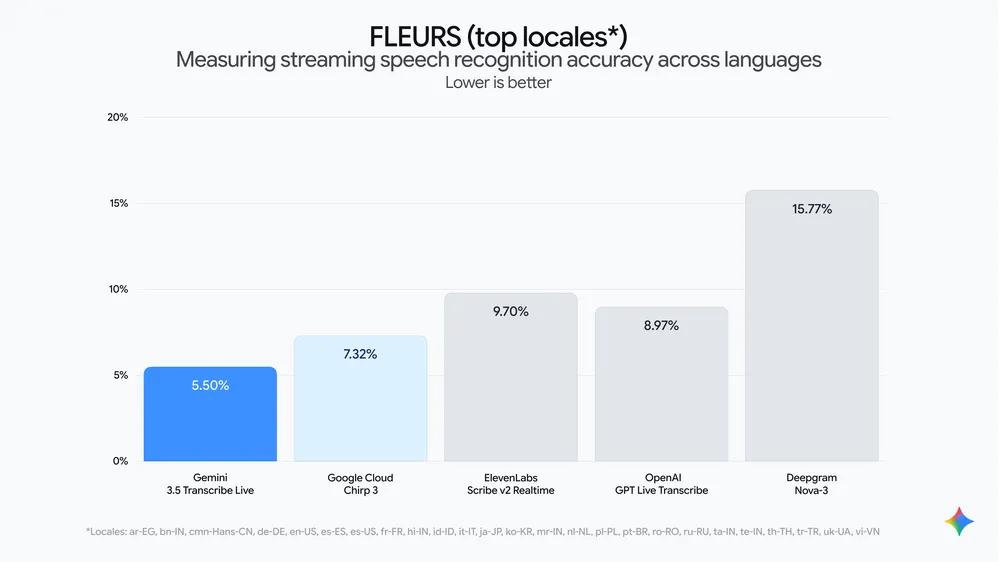
Source: Google's original FLEURS streaming chart. Google reports 5.50% WER for Gemini 3.5 Transcribe Live versus 7.32% for Chirp 3 across its listed top locales. Lower is better; the vendor selected the comparison set, and AIToolHunt did not reproduce it.
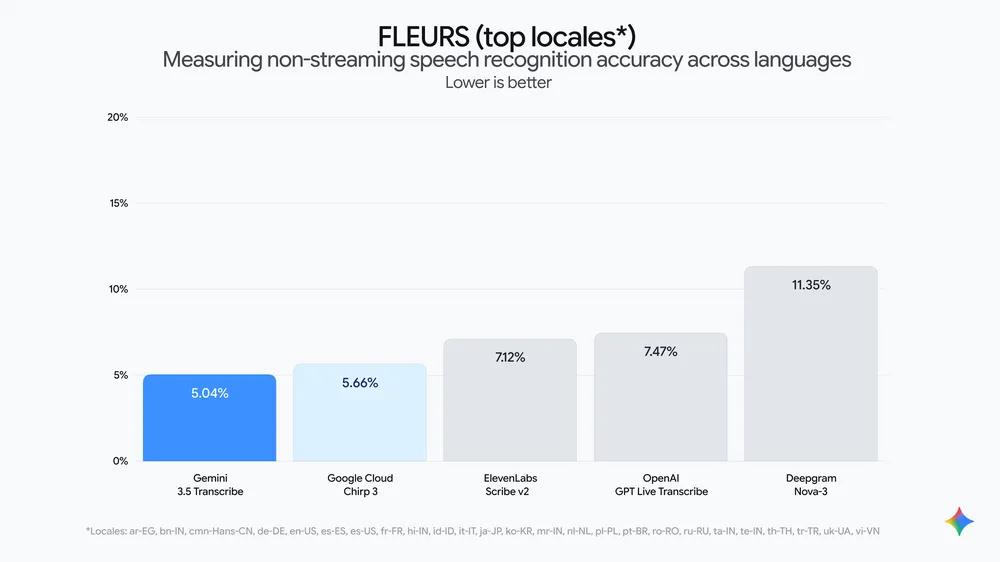
Source: Google's original FLEURS non-streaming chart. Google reports 5.04% WER for Gemini 3.5 Transcribe versus 5.66% for Chirp 3 under the same published locale boundary. This is vendor-reported evidence, not an independent reproduction.
The two evidence sets answer different questions. Artificial Analysis helps compare the released APIs under one external harness. Google's FLEURS charts show the vendor's multilingual case against selected models. Neither replaces tests with your own audio.
The developer view
Start with a small evaluation set that contains your worst real inputs: background noise, interruptions, code identifiers, addresses, product names, accented speech, and mid-sentence language changes. Keep human reference transcripts and score smart and verbatim output separately.
For live products, measure more than first-token speed. Track time to a stable final transcript, correction churn, speaker-turn errors, and the cost of downstream actions triggered by wrong text. A voice agent that responds quickly to the wrong postal code is not a good experience.
For recorded audio, verify timestamp stability and speaker attribution before building search, analytics, or summaries on top. The three-speaker documented limit is a product boundary, not a suggestion.
The product enthusiast view
If you already use dictation to draft messages, prompts, or notes, smart mode is the interesting change. It can reduce the awkward pause-and-edit loop that makes speech input slower than typing.
If you need meeting evidence, quotations, captions, or an interview record, smart cleanup should not be the default. Use verbatim mode, keep the audio, and treat any later summary as a separate transformation.
Who should try Gemini 3.5 Transcribe now?
Try it now if
- you are building a voice agent, live captioning surface, or post-call workflow;
- your current transcription stack struggles with jargon or language switching;
- you can compare output against a labeled audio set before production;
- smart dictation would remove a real editing step for users;
- your product can show and preserve the chosen transcription mode.
Wait or restrict it if
- transcripts are legal, medical, financial, employment, or safety records;
- you cannot retain the source audio needed for dispute or audit;
- a silent rewrite could change a commitment, number, name, or quoted statement;
- you need reliable attribution for more than three speakers;
- your release process does not accept public-preview model behavior or API changes.
What remains unclear?
Several practical questions need real deployments, not launch-day claims:
- how smart mode behaves when a self-correction is ambiguous;
- whether custom vocabulary reduces one class of errors while creating another;
- accuracy for specific accents and code-switching pairs inside the 85-language claim;
- speaker attribution quality when people overlap or interrupt;
- production quotas, stability, and long-term pricing after public preview;
- whether Chrome rollout and other consumer surfaces will expose a clear verbatim option;
- how often users notice that polished text differs materially from what they said.
Quick Take
- What is actually new?: Evidence-backed answer: Purpose-built live and recorded speech-to-text APIs with smart cleanup and a verbatim path
- What is the best use today?: Evidence-backed answer: Dictation, voice interfaces, captions, and call workflows with a local evaluation set
- What is the strongest evidence?: Evidence-backed answer: Artificial Analysis measurements plus Google's original FLEURS charts
- What should developers verify?: Evidence-backed answer: Mode fidelity, finalization latency, vocabulary errors, speaker attribution, and preview stability
- What is still unknown?: Evidence-backed answer: Production reliability across real accents, noise, domains, and post-preview conditions
Bottom line: Gemini 3.5 Transcribe looks worth a controlled test. Use smart mode when the output is a draft; use verbatim mode when the output is a record.
FAQ
Is Gemini 3.5 Transcribe available now?
Yes, for developers in public preview through Google AI Studio and Google's enterprise agent platform as of August 26, 2026. Consumer availability varies by product, language, and country. The macOS Gemini app launched in English, Android Rambler is limited by market, and Chrome support was still upcoming.
How accurate is Gemini 3.5 Transcribe?
Artificial Analysis measured 2.6% AA-WER for recorded audio and 4.0% for live transcription. Google published separate FLEURS figures of 5.04% and 5.50%. These results use different test boundaries, so evaluate the model on your own accents, noise, vocabulary, and microphone conditions.
What is the difference between smart and verbatim transcription?
Verbatim transcription keeps fillers, false starts, and corrections close to the spoken audio. Smart transcription removes disfluencies and formats or condenses the text. Smart fits drafts and commands; verbatim fits records, captions, interviews, and any workflow that must be checked against the audio.
How much does Gemini 3.5 Transcribe cost?
Artificial Analysis estimated about $5 per 1,000 recorded minutes and $9 per 1,000 live minutes using stated audio and text token assumptions. Treat those as point-in-time estimates, not a fixed quote. Check Google's current API pricing and your output-token pattern before budgeting.
Should developers use Gemini 3.5 Transcribe in production?
Start with a bounded pilot because both APIs launched in public preview. Test real audio, keep reference transcripts, measure finalization rather than only first-token latency, and preserve original audio for consequential workflows. Production use is reasonable only after your error, retention, and fallback requirements pass.
Find practical AI products and emerging developer tools at AIToolHunt.
Sources
- Google: Intelligent transcription with Gemini 3.5 Transcribe
- Google for Developers: Smart and verbatim transcription demo
- Artificial Analysis: Gemini 3.5 Transcribe measurements
- The Verge: Google's new AI transcription edits out your ums and ahs
- The Decoder: Gemini 3.5 Transcribe turns speech to text in 85 languages