
Newsletter
Join the Community
Subscribe to our newsletter for the latest news and updates
AI-generated reproduction test from prompt #5. Not a real YouTube page or a real video.
The scary part of GPT Image 2 is not that it makes prettier pictures.
The scary part is that the images are starting to look like evidence.
Over the past few weeks, X has been full of community examples claiming to show "GPT Image 2" or rumored OpenAI image models under arena-style test names. That caveat changed: OpenAI's developer docs now list GPT Image 2 as a state-of-the-art image generation model, with the snapshot gpt-image-2-2026-04-21.
But the community tests are still worth paying attention to.
Because if these examples are even close to what is coming next, the real shift is not "AI art got better." It is this: screenshots, UI mockups, game captures, conference photos, and documentary-style images are becoming cheap to fake and hard to ignore.
I recreated seven prompts inspired by the most interesting X examples I found. The images in this article are the actual outputs from those prompts, not placeholders.
Then I looked at them like a marketer, founder, and content operator who actually has to publish things without embarrassing the brand.
Here is what mattered.
GPT Image 2 is OpenAI's current state-of-the-art image generation model for fast, high-quality image generation and editing, according to OpenAI's developer docs.
That distinction matters because the model is now official, but the viral images that inspired this article are still not official OpenAI demos. Treat them as community prompt patterns and reproduction tests unless the creator provides generation metadata or OpenAI publishes the same examples.
So this article is not a launch announcement or benchmark.
It is a field report: what the strongest community prompts are testing, why those tests matter, and how I would publish the resulting images without overstating the evidence.
Sources I checked:
I used seven prompts inspired by high-signal community examples on X.
The images were generated separately before this article, so I am treating them as user-generated reproduction tests, not official OpenAI demos.
I looked for five things: prompt adherence, readable text, UI plausibility, real-world detail, and whether the image would mislead a casual reader if shown without context.
I did not evaluate "beauty" as the main metric. Pretty images are easy to overrate.
The real question was: could this image survive a two-second scroll on X and feel real enough to make someone stop?
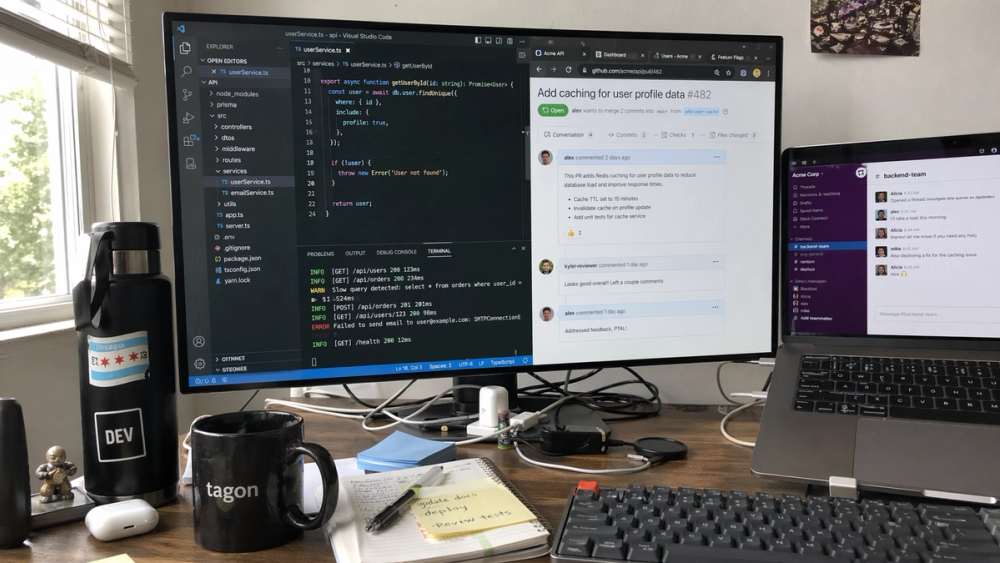
AI-generated reproduction test based on a community prompt pattern. Not a real workspace photo.
Prompt used:
Create a candid iPhone photo of an average software engineer's desk at 9 AM. Show a monitor with VS Code, a GitHub pull request, terminal logs, Slack messages, browser tabs, and a small coffee mug nearby. The desk should look realistically messy, not staged. Make all visible UI text and code snippets readable. Natural morning window light, 16:9.This is a deceptively hard prompt.
Most image models can draw a laptop and a coffee mug. The better test is whether the scene feels like a real working desk: browser tabs, terminal noise, Slack interruptions, pull request context, cables, and that slightly embarrassing "I meant to clean this yesterday" energy.
What to inspect: Look at the main monitor and laptop. This output gets the broad layout right: VS Code on the left, a GitHub pull request in the center, Slack-style team chat on the right, plus a messy desk with notes, cables, and a mug.
The text is not perfect, but it is far past decorative gibberish. You can tell what each surface is supposed to be.
Why it matters: This is the kind of image a SaaS founder can use for a blog header, launch post, or "day in the life" thread. It does not need to be perfect. It needs to feel like the reader's Tuesday morning.
Watch out: If the generated UI includes real company logos or private-looking messages, crop or blur before publishing. The test is about realism, not pretending the image documents a real employee's desk.
Best for: developer tools, productivity blogs, SaaS launch posts. Skip if: you need a legally clean product screenshot or accurate code sample.
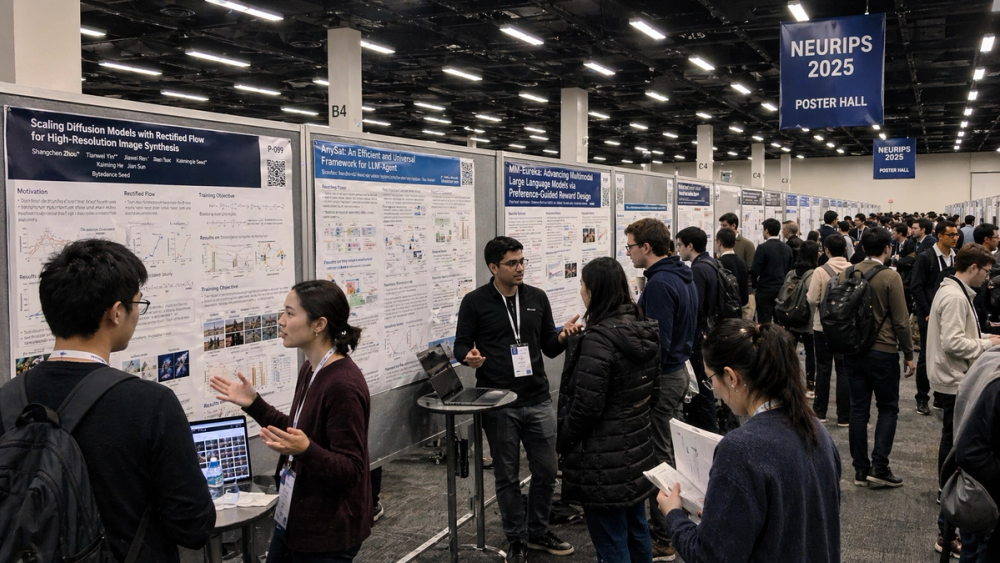
AI-generated reproduction test of a conference poster hall. Not a real NeurIPS photo.
Prompt used:
Create a realistic wide-angle smartphone photo inside the poster hall at NeurIPS 2025. Show rows of research posters, researchers wearing badges, laptops on small tables, people discussing papers, and readable poster titles about diffusion models, agents, and multimodal learning. Fluorescent conference lighting, documentary style, 16:9.This test is about density.
A poster hall has too many things happening at once: faces, badges, laptops, tiny typography, poster layouts, aisle perspective, conference lighting, and awkward human clustering. Older image models often turned this into generic "tech people near rectangles."
What to inspect: The banner, poster rows, laptops, badges, and aisle perspective all work. The front-left poster title is readable enough to understand the intended topic, while smaller body text still breaks down under inspection.
That is exactly why this is a useful test: it looks credible at a glance, but it still needs disclosure.
Why it matters: Conference photos are credibility assets. Founders use them in investor updates. Researchers use them in recaps. Agencies use them in thought leadership.
If models can generate convincing event photography, the default reader question changes from "does this look good?" to "did this actually happen?"
Watch out: Do not publish this as if it came from a real NeurIPS venue. For a blog, label it clearly as an AI-generated stress test.
Best for: AI research explainers, event recap illustrations, conference trend posts. Skip if: you need documentary proof or real attendee representation.
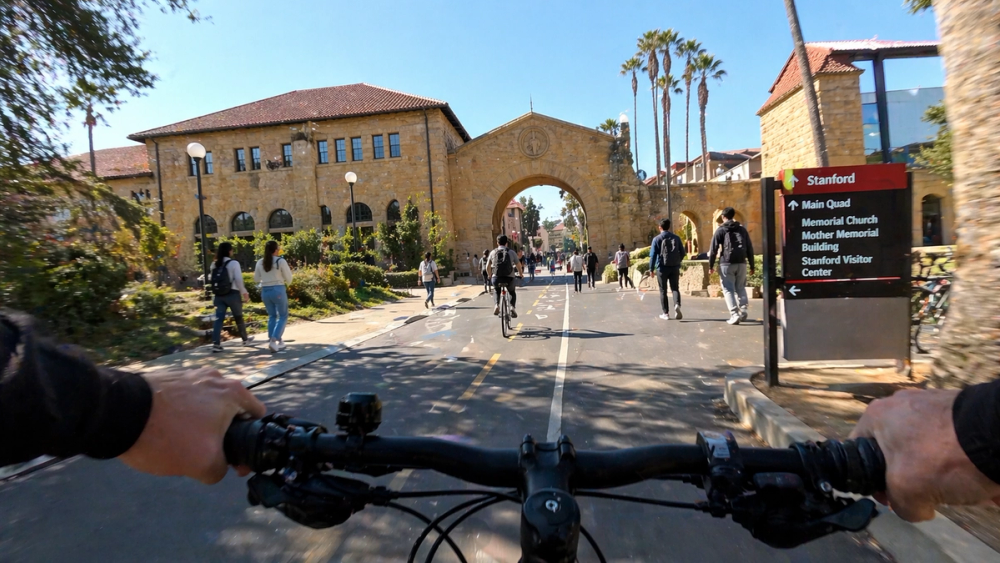
AI-generated reproduction test of a campus POV scene. Not a real Stanford campus photo.
Prompt used:
Create a first-person POV photo from a bicycle riding through Stanford campus on a sunny afternoon. Show sandstone arches, palm trees, students walking with backpacks, bike lanes, campus signs, and realistic motion blur at the edges. It should feel like a real GoPro still, not a travel poster. 16:9.This one is not about logos or text. It is about place memory.
"Stanford campus" has a visual grammar: sandstone, arches, palm trees, open paths, warm light, bikes everywhere. A weak model gives you "generic California university." A strong one gives you something that feels like it came from a student's camera roll.
What to inspect: The bike handlebars sell the POV immediately. The sandstone buildings, palm trees, campus sign, bike lane, and slight edge blur make the image feel like a GoPro still rather than a tourist brochure.
Why it matters: The best marketing images often need controlled imperfection. Real phone photos convert because they look low-friction and human.
This is where image generation gets commercially useful: not in making everything cinematic, but in making something believably ordinary.
Watch out: If a campus sign becomes readable and looks official, avoid using it in a way that implies endorsement.
Best for: education tech, student productivity, creator storytelling. Skip if: location accuracy is mission-critical.
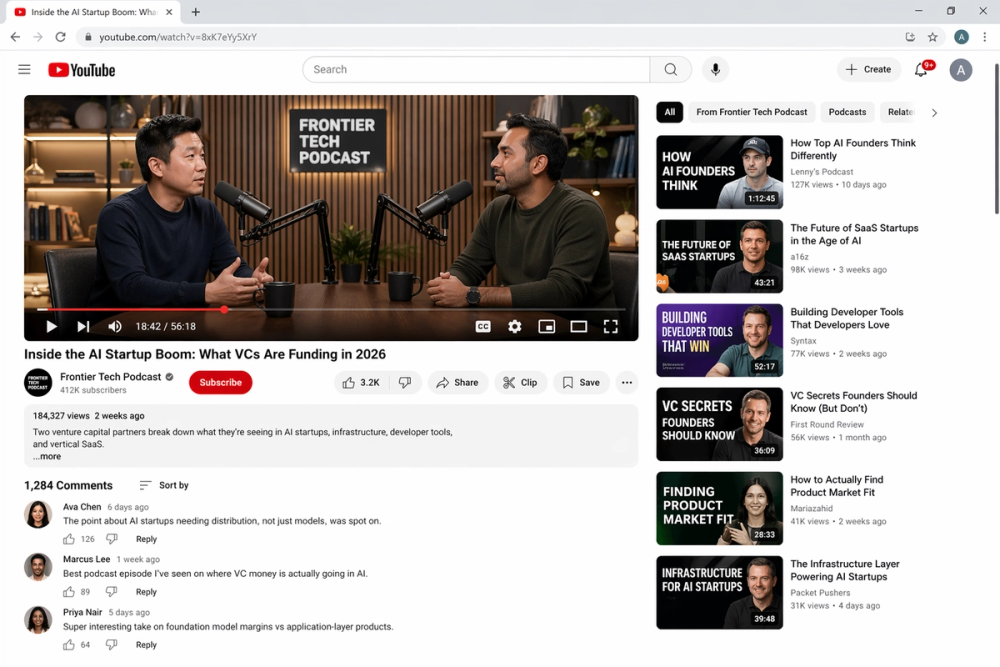
AI-generated reproduction test of a video platform interface. Not a real YouTube page.
Prompt used:
Create a realistic desktop YouTube screenshot of a tech podcast episode page. The video player shows two venture capital partners in a studio discussing AI startups. Include a readable title, channel name, view count, timestamps, comments, subscribe button, and recommendation sidebar. Make it look like a real YouTube interface, not a concept mockup.This is the image that made me sit up.
For years, generated UI looked like a designer's mood board: nice rectangles, bad text, no real information hierarchy. This prompt asks for the opposite. It asks for a familiar platform screenshot with enough little details to pass at a glance.
What to inspect: The output generated a full page, not just a video frame: title, channel, subscribe button, view count, recommendation sidebar, comments, and playback controls.
The YouTube-like layout is strong enough that the caption has to do real work. Without a label, a casual reader could easily treat it as a real screenshot for a second or two.
Why it matters: This is where the trust problem gets practical. Fake product screenshots, fake media screenshots, fake dashboard screenshots, fake "look what I found" posts - the cost of producing all of them keeps dropping.
For creators, that means two things:
Watch out: Do not use real platform branding in a way that implies the screenshot is authentic. For publication, I would add a visible caption and avoid placing it near claims that depend on the screenshot being real.
Best for: media analysis, creator economy posts, UI realism stress tests. Skip if: the article needs verified platform evidence.
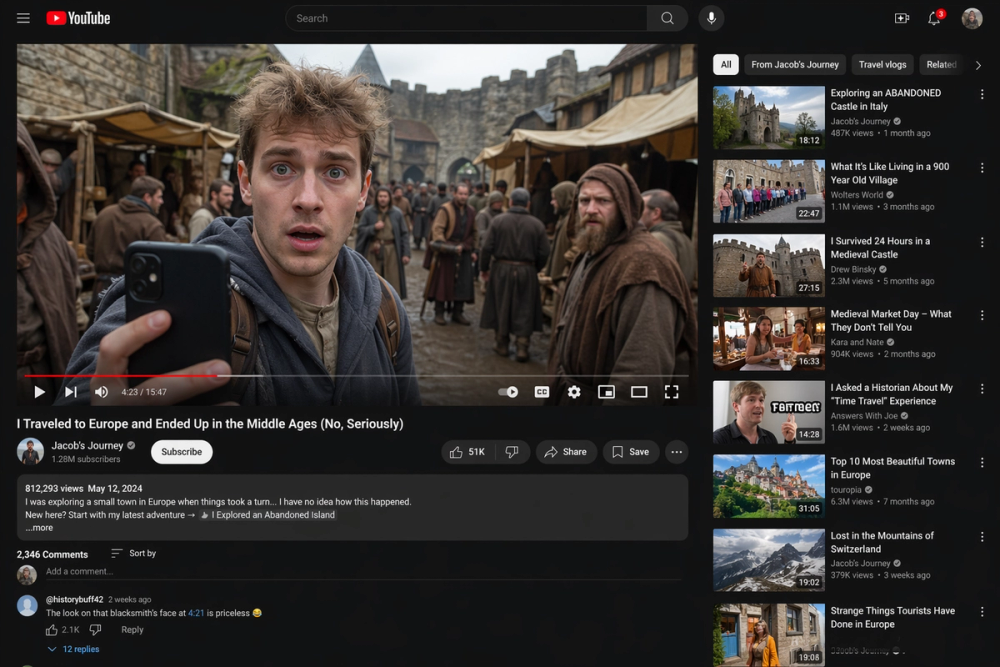
AI-generated reproduction test of a fictional YouTube screenshot. Not a real video.
Prompt used:
Create a realistic screenshot of a YouTube video showing a modern travel vlogger who accidentally time-traveled to the Middle Ages. The video frame shows the vlogger holding a phone in a medieval market. Include realistic YouTube UI, readable title, channel name, comments, timestamps, and sidebar recommendations. Documentary screenshot style.This is the most viral-friendly test in the set.
It is obviously fictional if you think for three seconds. But that is not how social feeds work. Social feeds reward the first half-second: the composition, the familiar UI, the weird story, the "wait, what?" reaction.
What to inspect: The dark-mode YouTube interface, video title, channel, related videos, comments, and progress bar all make the impossible premise feel like a shareable screenshot.
The scene itself is absurd. The container is familiar. That combination is the hook.
Why it matters: The model does not need to fool experts. It only needs to be plausible enough to earn a pause, a screenshot, and a repost.
That is why this kind of prompt is useful for testing AI image models. It reveals whether the model can place impossible events inside familiar digital evidence.
Watch out: This is exactly the type of image that should carry an "AI-generated" label in any serious article.
Best for: viral hooks, media literacy posts, AI safety explainers. Skip if: your brand cannot tolerate ambiguity around fake screenshots.
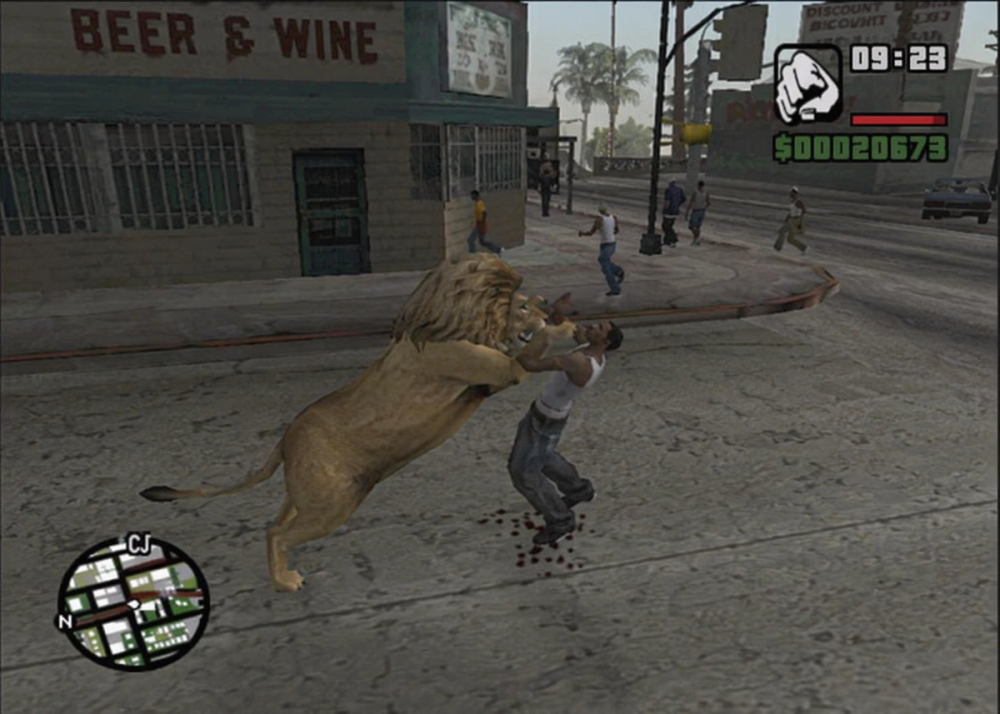
AI-generated reproduction test of a retro gameplay screenshot.
Prompt used:
Create a gameplay screenshot from a PS2-era open-world crime game inspired by early-2000s Los Angeles. A lion is fighting an NPC on a street corner. Include authentic old game HUD elements, health bar, minimap, low-poly character models, washed-out lighting, and screenshot compression artifacts. It must look like real gameplay, not fan art.This prompt is funny, but it is not a joke.
The model has to understand a whole bundle of references: PS2-era graphics, open-world HUDs, low-poly characters, washed-out lighting, screenshot compression, and the specific absurdity of a lion fighting someone on a street corner.
What to inspect: The HUD is the giveaway: minimap, health bar, cash counter, fist icon, clock, washed-out street, and old console compression. The image understands the screenshot format, not just the lion.
Why it matters: Game studios, modders, YouTubers, and nostalgia creators can use this style of generation for thumbnails, pitch boards, and concept exploration.
But the deeper point is bigger: models are getting good at format memory. They do not just know "a lion." They know "a lion inside a compressed early-2000s game screenshot."
Watch out: Avoid using specific game names, logos, or copyrighted characters if the image will be used commercially. Also note the visible attack/blood detail if your distribution channel is sensitive to violent imagery.
Best for: gaming essays, concept thumbnails, nostalgia marketing. Skip if: you need rights-cleared production assets.
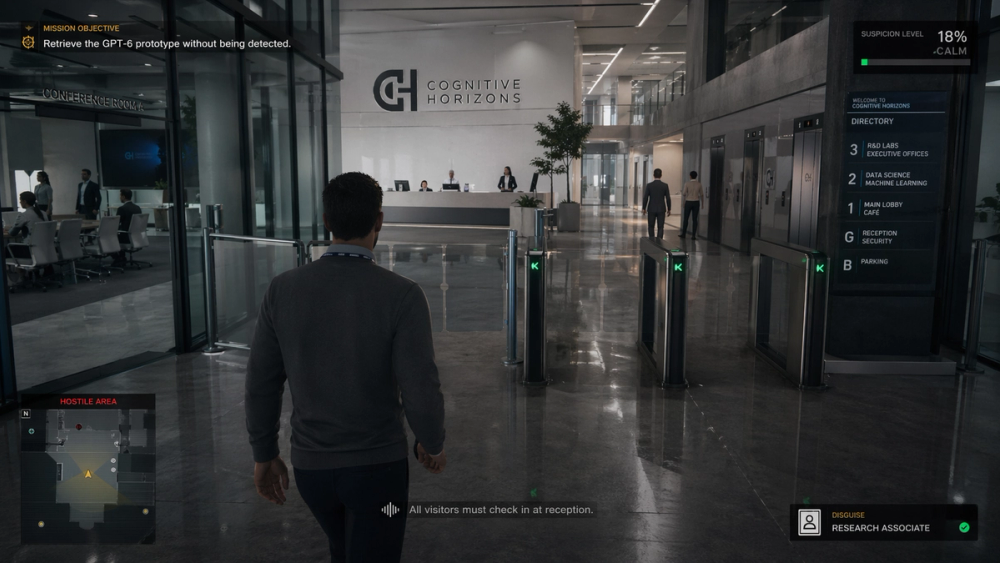
AI-generated reproduction test of a fictional stealth game scene.
Prompt used:
Create an in-game screenshot of a stealth assassination game level set inside a modern AI company headquarters. The player character is in disguise, walking through a glass office lobby. Mission objective on screen: "Retrieve the GPT-6 prototype without being detected." Include stealth UI, minimap, suspicion meter, and realistic office security details.This is my favorite creative test because it combines three layers at once:
Older models usually dropped one of those layers. You would get a nice office but no game UI, or a game UI with a nonsense environment, or a cinematic scene that forgot the mission objective entirely.
What to inspect: The mission objective, suspicion meter, minimap, disguise label, and office directory all sit naturally in the frame. The generated company name, "Cognitive Horizons," is also a good safety accident: it keeps the image fictional instead of pretending to depict a real OpenAI office.
Why it matters: This is how creators will storyboard future videos, pitch game ideas, and prototype fictional interfaces. Not as final production art, but as a fast visual language for explaining an idea.
Watch out: The "GPT-6 prototype" line is fictional. Keep it framed as satire or concept art, not product news.
Best for: speculative fiction, game concept posts, AI culture commentary. Skip if: you need official OpenAI-related visuals or brand-safe enterprise imagery.
My takeaway is simple: the next jump in AI image generation will be judged less by beauty and more by believability.
For creators, that is useful.
For publishers, it is dangerous.
For readers, it means a screenshot is no longer enough.
If I were turning these images into a public blog post or social thread, I would follow five rules.
First, label every image as AI-generated. Do it in the caption, not hidden in a footnote.
Second, avoid implying platform endorsement. A YouTube-like screenshot is a stress test, not proof of a real video.
Third, do not overclaim model provenance. GPT Image 2 is documented now, but a screenshot should still be described as "generated with this prompt" only when you know how it was produced.
Fourth, show the prompts. Prompts make the article useful and harder to dismiss as vibes.
Fifth, judge outputs by task, not taste. A messy iPhone photo can be a better result than a beautiful poster if the prompt asked for a messy iPhone photo.
That last rule is the one most AI image reviews miss.
Is GPT Image 2 officially released? Yes. OpenAI's developer docs now list GPT Image 2 as a state-of-the-art image generation model, with the snapshot gpt-image-2-2026-04-21. The caution in this article is about the community examples, not whether the model page exists.
Can I use these prompts in ChatGPT Images? Yes. These prompts are written to be copy-pasted into ChatGPT Images. Your results may vary depending on rollout, plan, model routing, safety filters, and image generation limits.
Why are fake screenshots such a big deal? Because screenshots used to carry social proof. A realistic UI screenshot can imply that a video, product, dashboard, or event exists. Once those become cheap to generate, captions and sourcing matter more.
Which test should I run first? Start with the YouTube podcast screenshot or the engineer desk. They expose the biggest practical gap: whether the model can handle dense, readable, familiar interfaces without turning everything into decorative noise.
Should marketers use these images? Yes, but carefully. Use them for concept art, editorial illustrations, prompt studies, and clearly labeled AI experiments. Do not use them as fake evidence, fake case studies, or fake product screenshots.
Discover more AI tools, experiments, and product trends at AIToolHunt.