
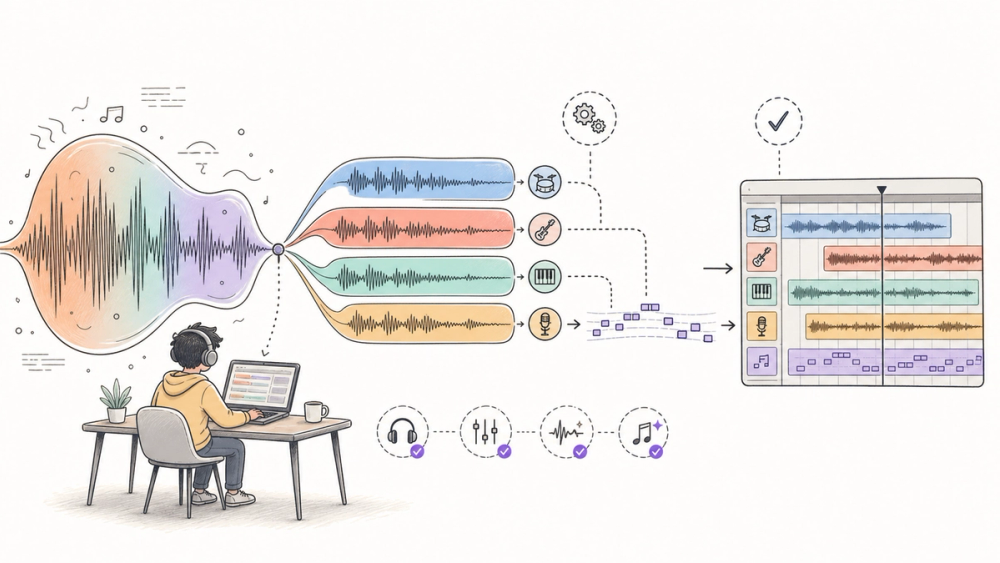
Suno MIDI export is not a new model launch. It is still worth paying attention to because Suno's latest feature roundup puts stems, MIDI, lyrics, screenshots, and car playback in the same product story: AI songs are moving from prompt output toward editable production material.
Quick Navigation
- What is Suno MIDI export? A Studio export path for moving stems into a DAW.
- What changed in Suno's July feature roundup? The official roundup connects MIDI, Advanced Stems, mobile, and lyrics.
- How does Suno MIDI export work? It starts from stems, not from a perfect finished score.
- Why should builders care? The product direction is editable AI music, not just instant songs.
- What remains unclear? Tier details, credit math, transcription quality, and API access.
- FAQ: Five practical questions before paying for Premier.
What We Know So Far
The public evidence supports a useful but narrower story. On July 26, 2026, Suno posted an official X roundup listing Advanced Stem Separation, Export Stems as MIDI, Lyric Co-Writer and Autosave, Screenshot to Song, Apple CarPlay, and Android Auto (Suno on X). Suno's own export and release-note pages show that parts of this workflow existed before the roundup, making it a product-direction signal rather than a single-day launch.
The decision guide below is based on public docs, Suno's official demo media, independent workflow writeups; it does not include a paid-account hands-on test.
What is Suno MIDI export?
Suno MIDI export is Suno Studio's way to turn an AI-generated track or stem into a standard MIDI file for editing in a digital audio workstation, not a magic full arrangement you can publish untouched. Suno's July 26 roundup lists "Export Stems as MIDI" beside Advanced Stem Separation, Lyric Co-Writer, Screenshot to Song, and car integrations (Suno on X). The older Suno export guide says Studio exports can include full songs, selected ranges, multitrack stems, and standard MIDI files. Independent MIDI workflow guides such as Audio2Guitar frame the result more cautiously: useful for DAW sketches, less reliable as playable guitar notation or finished transcription. The practical answer is simple: try it if you already edit stems in Ableton, Logic, FL Studio, Reason, or another DAW; wait if you only need a finished song download.
What changed in Suno's July feature roundup?
- Suno Studio was already positioned as a browser-based creative workspace (Suno Studio).: What Suno highlighted on July 26: Suno grouped Studio-adjacent export, stem, lyric, screenshot, and mobile playback updates in one official post (Suno on X).; Why it matters: The product story is moving from prompt-to-song toward edit-and-reuse.
- MIDI and stem export already appeared in Suno's export documentation.: What Suno highlighted on July 26: The roundup pushes "Export Stems as MIDI" as a headline user-facing workflow (Suno export guide).; Why it matters: Creators should judge whether the output is editable enough for their actual DAW work.
- Stem separation was a common bottleneck for AI-generated tracks.: What Suno highlighted on July 26: Suno's Advanced Stems release notes describe Auto Split, Split from Mix, and Advanced Split modes (Suno release notes).; Why it matters: Cleaner source parts make MIDI and remix workflows more credible, but not automatic.
The smart read is not "Suno invented MIDI export yesterday." It did not. The smart read is that Suno keeps tightening the handoff between generated audio and human editing.
That is a more practical story for creators. If you make demos, jingles, meme songs, or draft hooks, the raw song is often enough. If you want to swap a bass sound, change a chord voicing, clean a vocal, or hand parts to a musician, the export path matters more than the prompt box.
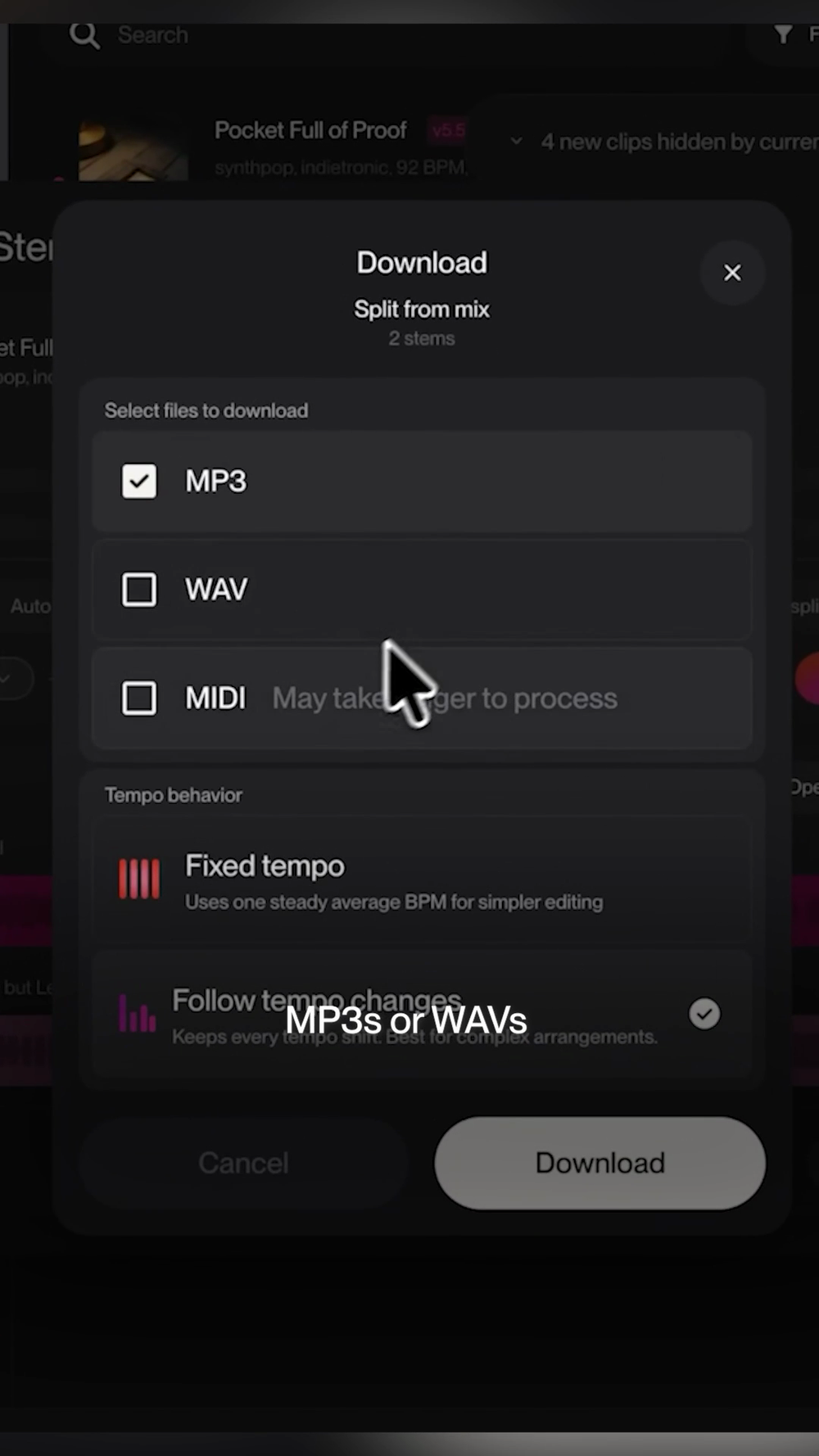
Source: Suno's July 26 official feature roundup on X. This frame shows the product demo's export panel; it does not independently prove MIDI accuracy.
How does Suno MIDI export work?
Suno's export docs describe Studio as the place where you get material out of Suno and into a production workflow. The useful options are not only "download the song." They include full-song exports, selected time ranges, multitrack stems, and standard MIDI files (Suno export guide).
That means the quality question shifts. A WAV export asks, "Does this sound good enough?" A MIDI export asks, "Can I edit these notes without fighting the transcription?"
The cleaner the stem, the easier that second question becomes. Suno's Advanced Stem Separation page describes more precise separation choices, including Auto Split, Split from Mix, and Advanced Split for choosing specific instruments (Suno help). Independent writeups make the same practical point: regenerated or cleaner stems are more useful when you plan to remix, replace sounds, or continue the arrangement in a DAW (Dubspot, Peak-Studios).
The developer view
For developers, the interesting part is not a new API. The cited official sources do not document a public Suno API announcement tied to this roundup, and several replies to the official post still ask for API access.
The product design lesson is stronger: AI media tools are becoming editing surfaces with export contracts. If you build creative software, the sticky workflow is not just generation quality. It is whether the output survives handoff into the user's existing stack.
That suggests concrete checks for any AI music tool: file formats, stem naming, tempo behavior, timing drift, per-stem credit cost, commercial-use terms, and whether exports preserve enough structure for downstream software.
The product enthusiast view
For normal AI music users, Suno's update is a filter. If your goal is to make and share finished songs inside Suno, the new export story may not matter much.
If your goal is to turn a generated idea into something you can actually arrange, remix, play, or hand to another musician, MIDI export and Advanced Stems are the features to test. The catch is that "MIDI" does not mean "clean sheet music." Audio2Guitar's guide says Suno MIDI can be useful for DAW sketches while still falling short for playable guitar tabs and finished transcription (Audio2Guitar).
My blunt take: pay attention if you already know why you need stems. Wait if you are buying Premier only because the word MIDI sounds professional.
Why should builders care?
- Editable output beats novelty demos - A generated song becomes more valuable when you can split, revise, and reuse parts without starting over. 2. Format support is a product moat - MP3 is consumption. WAV, stems, and MIDI are production. That difference affects retention. 3. Human review still owns the finish - MIDI exports should be treated as sketches to inspect, not as finished arrangements.
What remains unclear?
The first unknown is access. Suno's public pages and third-party workflow guides point to tier and credit requirements, but these can change. Check the controls shown in your account before treating any price or credit math as permanent.
The second unknown is quality by instrument. Monophonic lines, bass parts, and simple melodies are usually easier than dense chords or busy full mixes. The article does not claim that Suno's MIDI output is accurate across genres.
The third unknown is developer access. Suno's roundup is product-facing, and no official API change is documented for this post, so developers should not treat it as a platform launch.
Quick Take
- What is actually new?: Evidence-backed answer: Suno officially grouped MIDI export, Advanced Stems, lyric help, Screenshot to Song, and car playback in a July 26 roundup.
- Who can use it now?: Evidence-backed answer: Suno users with the relevant Studio access; exact plan and credit details should be checked in-account.
- What is the strongest evidence?: Evidence-backed answer: Suno's official X demo plus Suno's export and Advanced Stems documentation.
- What should developers verify?: Evidence-backed answer: Export formats, stem quality, tempo behavior, credit cost, rights terms, and lack of public API changes.
- What is still unknown?: Evidence-backed answer: MIDI accuracy across complex tracks and whether Suno will expose these workflows through developer tools.
I would test Suno MIDI export for remixing, sketching, and DAW handoff. I would not treat it as a replacement for arrangement judgment, notation cleanup, or a musician's final pass.
FAQ
What is Suno MIDI export? Suno MIDI export lets Studio users turn AI-generated stems or track material into standard MIDI files for editing in a DAW. It is best understood as editable sketch data, not a guaranteed finished score.
Is Suno MIDI export available now? Suno's public export guide documents MIDI export inside Studio, and the July 26 roundup highlights "Export Stems as MIDI." Availability can depend on account tier, feature rollout, and credit rules, so check your live Suno account before paying.
How is Suno MIDI export different from a WAV download? A WAV is audio you can mix or master. MIDI is note and timing data you can assign to instruments, edit in a piano roll, quantize, or rearrange. MIDI is more flexible but also easier to mis-transcribe.
What should developers know before building around it? Do not assume a public API exists because the product UI exports MIDI. Verify official developer access, file format behavior, tempo handling, rights terms, and whether your workflow can tolerate transcription cleanup.
What is still unverified about Suno MIDI export? The official demo shows MIDI as an export option, but public evidence does not prove universal accuracy. Dense chords, layered mixes, unusual vocals, and timing-sensitive genres still need manual inspection after export.
Discover practical AI products and emerging tools at AIToolHunt.